TabbySpaces
Visual Workspace Editor for Tabby Terminal
Why TabbySpaces?
New workspace = more YAML editing
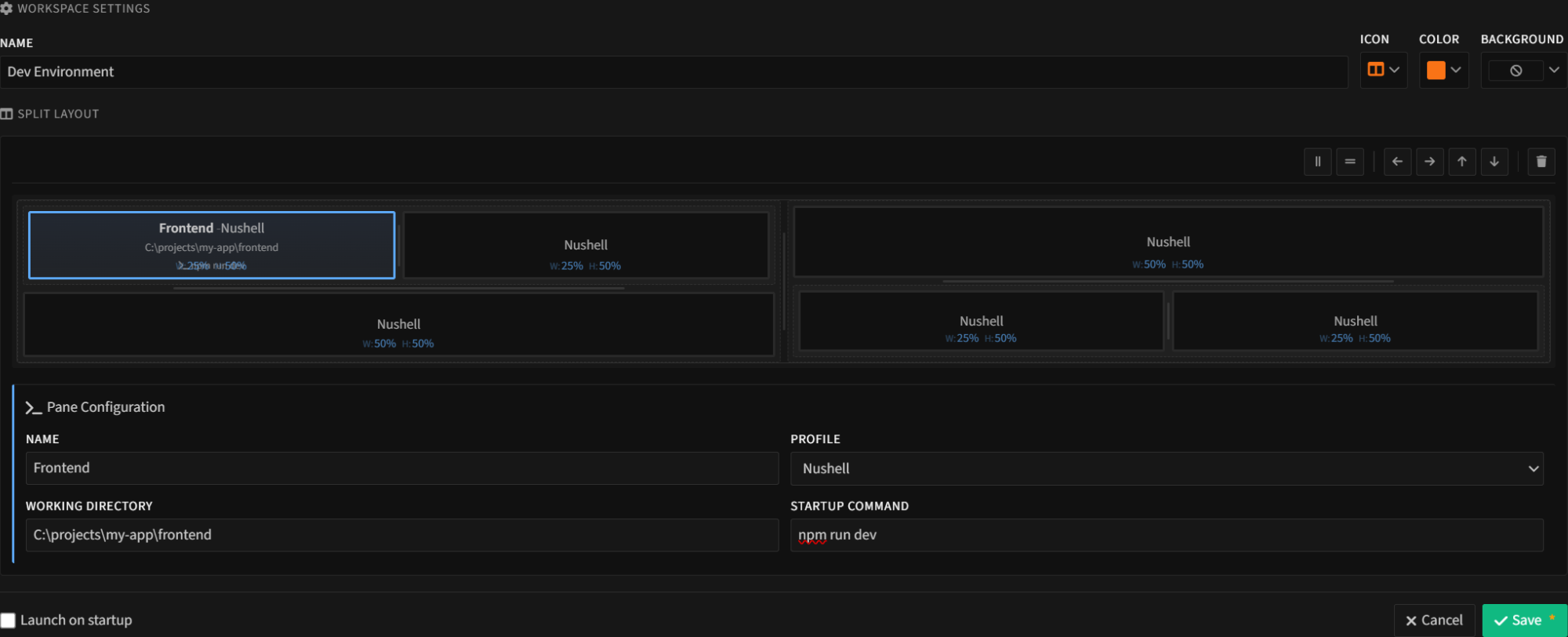
Visual editor - point, click, split
Complex layouts lost when tabs close
Saved workspaces, one-click restore
Different projects need different layouts
Unlimited workspaces with custom icons & colors
Manual setup every time terminal opens
Auto-launch favorite workspaces on startup
Key Features
Visual Split Editor
Split horizontally, vertically, nest to any depth. No YAML, no config files.
Per-Pane Settings
Set shell, working directory, and startup command for each pane.
Workspace Library
Organize workspaces with custom names, icons (18), and colors (8).
One-Click Launch
Open any workspace instantly from the toolbar dropdown.
Startup Workspaces
Mark workspaces to auto-launch when Tabby starts.
Any Shell
Works with Bash, Zsh, PowerShell, Nushell, cmd, WSL - any shell Tabby supports.
See It In Action
Installation
Via Tabby Plugin Manager
- Open Tabby Settings
- Go to Plugins
- Search for
tabbyspaces - Click Install
Via npm
npm install tabby-tabbyspacesInstall in Tabby's plugins directory